
Free online survey builder
Create surveys that turn feedback into a next step.
Build an online survey, publish it by link or embed, and collect unlimited static responses for free. Use fixed questions for results you can compare, or add AI follow-ups when an answer needs more context. Start with a template and shape the questions around the decision you need to make.
Start for freeFree includes 100 total respondent AI conversations across your organization. Custom logos, domains, and branding removal are paid options. See plan details.
What is an online survey builder?
An online survey builder lets you write questions, choose answer formats, publish a questionnaire, and review responses without writing code. Surveys are especially useful when you want to compare experiences across a group: what customers struggled with, which event sessions helped, or how a team feels about a recent change.
A contact form usually starts a conversation with one person. A survey starts with a research question. Before choosing colors or adding fields, finish this sentence: “We will use these answers to decide whether to…” That decision keeps the questionnaire focused and helps you avoid collecting information you will never use.
Build an onboarding survey: a worked example
Imagine a software team deciding which part of onboarding to improve next. Its audience is people who signed up recently. The team needs to know what they tried, where they got stuck, and what would have helped.
- Start with experience. “Which setup steps have you tried?” Offer the actual steps in your product, plus “I have not started yet.” This separates a difficult experience from a step someone has never attempted.
- Ask for one assessment. “How easy or difficult was it to finish your first setup?” Keep the scale balanced, label both ends, and offer an appropriate not-applicable choice. Do not combine setup speed and support quality in one score.
- Find the obstacle. “What, if anything, made setup difficult?” Use an open text answer. If the respondent has not started, use a different branch: “What has kept you from getting started?” That avoids asking them to judge an experience they have not had.
- Identify a next step. “What would have helped you move forward?” Treat suggestions as evidence to investigate, rather than an automatic feature priority. An optional email field can invite a follow-up conversation with a clear explanation of how it will be used.
In Deformity, create the questions manually or describe this brief to the AI builder. Review the generated wording, configure the branches with conditional logic, then submit test answers for both a completed setup and an unstarted setup. Check every route before publishing.
Where an AI follow-up helps
A respondent writes, “The connection failed.” A useful follow-up might ask which service they were connecting and what they saw. The follow-up adapts to the answer. Keep the core satisfaction question fixed if you want to compare scores over time, and use the conversation to understand the reason behind it.
Write questions people can answer accurately
Clear wording matters more than adding another feature. “How great was our fast onboarding?” suggests the answer you want. “How would you describe your onboarding experience?” leaves room for positive and negative feedback. Ask about a specific event or period so respondents do not have to guess what you mean.
Choose the format for the job
Use a single choice when answers should be mutually exclusive, multiple choice when several can apply, a rating for a consistent assessment, and text when you need an explanation in the respondent’s words. Include “Other” or “Not applicable” when your list cannot cover everyone. Do not force a score just to avoid an empty cell.
Remove avoidable effort
Ask one thing per question. “Was the workshop useful and well organized?” needs two answers if the content was helpful but the schedule was confusing. Keep optional detail optional, avoid internal jargon, and preview long answer labels on a phone. Branch around irrelevant questions instead of making everyone dismiss them.
Run a small pilot with people who resemble your audience. Ask what they thought each question meant and where they hesitated. Revise ambiguous wording before the main launch. If you change a key question during collection, record the change so you do not compare answers as though everyone saw the same survey.
Start with a survey template that fits the decision
Templates supply a starting structure and design. Read every question before sharing, remove anything unrelated to your goal, and replace generic wording with the experience your respondents actually had.
Customer satisfaction
Understand a recent purchase or service interaction. Pair an assessment with an optional explanation so a score has useful context.
Preview templateUser onboarding
Learn what new users attempted, what blocked them, and what help they needed. Adapt the worked example above to your product.
Preview template
Employee engagement
Ask about the working experience. Explain who can access answers and avoid promising anonymity without reviewing the collection setup.
Preview templatePublish, check the flow, and use the responses
Set your colors, fonts, and images in the designer, then preview the questions and ending on desktop and mobile. Share a direct link or website embed where the relevant audience will see it: a post-event email, onboarding message, or customer community. Test the published version, including any required fields, redirects, and integrations.
Explain the purpose, expected effort, and how you will use the answers in the introduction. Choose a distribution window that fits the experience you are researching. Sending a survey about a workshop months later asks people to reconstruct details they may no longer remember.
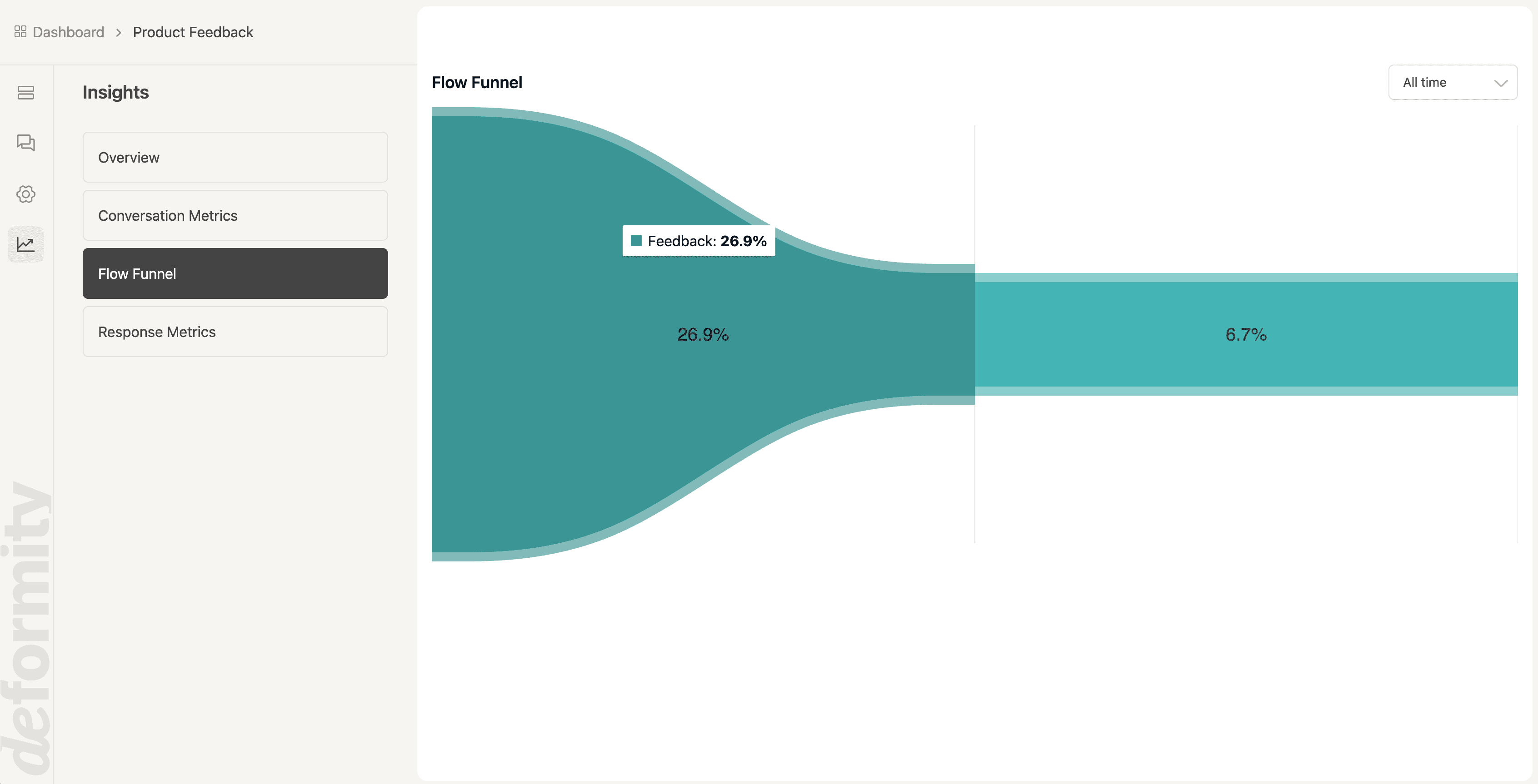
Review Insights for completion patterns, then read the answers in Conversations. If many people leave at the same question, check its wording, required status, and relevance. A drop-off can have several causes; compare the actual question and traffic source before changing it.
Export a CSV or connect Google Sheets. Separate test submissions from real responses, group comparable answers, and label recurring themes in comments. In the onboarding example, group setup obstacles by the step attempted, then read the explanations within each group. Keep original answers available so someone else can check your interpretation.
A useful research summary names the audience, collection dates, number of responses, main finding, and next action. Small or self-selected samples may miss other experiences. Use feedback to guide a follow-up test, and tell respondents what changed when appropriate; do not treat every percentage as representative of all customers.
What is free, and when would you upgrade?
Free includes unlimited surveys and unlimited static responses, subject to the fair use policy. Fonts, colors, images, conditional logic, links, and embeds let you publish a working survey without a paid branding package.
Respondent AI is separate: Free includes 100 total AI conversations across all workspaces in your organization, with no monthly reset. The AI builder allows five messages per form; you can continue editing manually. Choose a paid plan for additional AI capacity, your own logo, custom domains, removal of Deformity branding, or team collaboration. Review current pricing and limits before planning a large AI research campaign.
If you already use a different builder, compare the workflow you need rather than switching for appearance alone. Our Google Forms comparison covers Sheets, branching, and design; our Typeform comparison explains response limits and a manual migration checklist.
Online survey builder questions
Is this online survey builder really free?
Yes. Deformity Free includes unlimited forms and static responses, subject to fair use. The free respondent AI allowance is 100 total conversations across your organization, without a monthly reset. Builder AI has a separate limit of five messages per form. Custom logos, domains, branding removal, team collaboration, and more AI capacity require a paid plan.
How many questions should my survey have?
Use the smallest set that supports the decision you need to make. A short onboarding survey might need four core questions and one relevant follow-up. A detailed research study may need more. Time a complete test response, remove duplicated questions, and tell respondents honestly what to expect.
Can I create an anonymous survey?
You can omit identifying questions, but anonymity also depends on hidden values, tracking, integrations, and the content of open answers. Review those settings and explain who will see the data. Do not promise complete anonymity merely because you removed the name and email fields.
What is the difference between branching and AI follow-ups?
Branching follows rules you define, such as skipping a setup question when someone has not tried setup. AI follow-ups can ask for clarification based on what someone writes. Use fixed wording for comparable measurements and optional AI exploration when you need qualitative context.
Can I embed a survey on my website?
Yes. Publish a direct link or use the website embed options. Test the actual published page on mobile and desktop, including its height, scrolling, and ending. Custom domains are a paid option; an ordinary share link or embed does not require one.
Can people answer in different languages?
AI forms can detect a respondent’s browser language, unless you configure a fixed language. Static forms use the language you write them in. Test important translations and wording with someone who understands your audience, particularly when a term needs to mean the same thing across groups.
Can I export survey answers?
Yes. Export conversation data as CSV or connect Google Sheets to use responses in your own workflow. Send a test response first and confirm that the columns and values are useful. Keep raw answers separate from any notes, categories, or formulas your team adds later.
Should I make every survey question required?
Require only the answers essential to the survey’s purpose. Optional comments can add context without blocking submission. If you offer a follow-up interview, make the contact request clear and separate from the core feedback; someone may want to share an opinion without continuing the conversation.
Build your next survey around a clear question.
Choose a template, adapt the wording, and test a complete response. Start with a free static survey, then add AI exploration where it serves your research.
Start building for free